Array out-of-bounds error. Indexing an array out of bounds, known as a buffer overflow or buffer overrun, often happens when a program tries to put more data into an array than it can hold - similar to trying to pour ½ a liter of Diet Coke into a 5-ounce glass. Recalling that valid array index values lie between 0 ≤ index ≤ size-1, we generalize that any index value < 0 or ≥ size causes an out-of-bounds error. (No Diet Coke was spilled while photographing this illustration.)
The behavior of a program indexing an array out of bounds is unpredictable and erratic. Three conditions associated with the memory accessed by the out-of-bounds indexing account for most of the program's arbitrary behavior:
Ownership: Whenever the operating system allocates memory to a process (i.e., a running program), the process "owns" the memory until it returns it to the OS. An out-of-bounds index operation that accesses memory the process doesn't own causes an immediate runtime error, aborting the program. If the operation stays within the process's memory, it may corrupt adjacent data, return incorrect data, or "misplace" data it can't find later.
Content: Computer memory content is dynamic, varying based on the processes (including the operating system) the computer runs and their execution order. Computers run tasks based on user commands and system requirements (e.g., reading comics or watching amusing cat videos). Typical desktop operating systems don't erase memory when they return it to the OS. Consequently, the next process that uses it "inherits" the previous contents. How these obscure values affect a program depends on how it uses them.
Use: Apart from accessing unowned memory, how a process uses the data acquired by an out-of-bounds index operation has the greatest impact on its behavior. Although it may not crash the program, the accessed data is meaningless to the program currently running. Alternatively, using the data as a pointer or index into another array will likely crash the program quickly. Corrupted data may only cause a problem later, and then in a different part of the program. (For example, early in my software engineering career, I indexed an array out of bounds, corrupting a FILE variable. The C program consisted of 25 files; the corruption occurred in one file, and the failure, later in the program's execution, in a different file.)
Beyond creating a bug that is challenging to find, indexing an array out of bounds also creates a significant security risk. Several well-known computer viruses have exploited buffer overflow errors.
Remembering that C++ does not automatically test array indexes for out-of-bounds conditions is software developers' first step toward creating safe, secure, and robust code. Their next step is to understand when a program must test an index before using it and when testing is an unnecessary expense.
Whenever a program bases an array index on user input, it must verify that the final index value is valid before the indexing operation.
Door	doors[3];
int	door;

cout << "Choose a door: ";
cin >> door;

if (door > 0 && door <= 3)
	... doors[door - 1]...;
else
	cerr << "Valid doors are 1, 2, or 3" << endl;
Validating user input. A U.S. TV game show allowed contestants to choose one of three doors, keeping whatever was behind the selected door. The code fragment implements the selection operation. The doors are labeled "1" through "3," but the array of Door objects is indexed from 0 to 2. The program adjusts the label value to the index value by subtracting 1. If the contestant's adjusted value is valid, the program uses the selected Door object.
Add tests to prevent indeterminate loops from overrunning the end of the array:
int	scores[100];
int	score;
int	count = 0;

cout << "Enter a score (-1 to stop): ";

cin >> score;
while (score != -1 && count < 100)
{
	scores[count++] = score;
	cin >> score;
}
int	scores[100];
int	count = 0;

cout << "Enter a score (-1 to stop): ";

do
{
	cin >> scores[count++];
} while (scores[count - 1] != -1 && count < 100);
count--;		// discard the -1
Guarding indeterminate loops. The figure updates two examples from the previous section on Arrays And Loops. Both loops are modified to include a test (highlighted in yellow) to prevent them from overfilling the array.
Programmers must rigorously test calculations producing index values before deploying a program.
for (. . . i . . .)
	for (. . . j . . .)
		. . . array[i - j] . . .
Validating index calculations. This highly abbreviated example illustrates the out-of-bounds array error mentioned above. The code, which was mostly correct, was part of a multi-file program. Being dyslexic, I reversed the order of the two variables highlighted in yellow. The expression i - j initially produced a value greater than 0, went to 0, and then became negative, causing the index error. The error corrupted a variable defined and used in another file, but allocated in memory adjacent to the array.
Although it is possible to include an if-statement inside a loop to detect this kind of error, it incurs the expense of a needless test. The example illustrates a programmer-created logical error, which, when identified and corrected, will not cause further problems. Rather than adding a test, rigorously validate the code, using the debugger to locate and identify any errors.
Pass arrays to functions as two arguments: the array itself and the array's size or capacity.
int input(int* scores, int capacity)
{
    int count = 0;
    while (count < capacity && ...)
        cin >> scores[count++];
    return count;
}
void print(int* scores, int size)
{
    for (int i = 0; i << size; i++)
        cout << scores[i] << endl;
}
const int size = 8;
int capacity;
int scores[size];
(a)
(b)
(c)
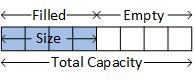
Arrays as function arguments. Passing an array to a function requires the array and an upper bound for indexing into it (the lower bound is always zero).
An abstract representation of an array, the values characterizing it, and the C++ code implementing it.
Programs calling functions that store data in an array should pass the array's capacity as an argument.
Programs calling functions using array data should pass the array's size (or length).
If a function saves data in an array and uses data already stored in it, programs may need to pass both the size and the capacity.