7.8.2. Two-Dimensional Array Example: multtab.cpp

array, two-dimensional array, array element, array syntax, index, subscript, for-loop, zero-indexed, loop-control variable, matrix
Time: 00:04:36 | Download: Large, Large (CC), Small | Streaming, Streaming (CC) | Slides: PDF, PPTX

The text presented the first version of multtab in Chapter 3 to demonstrate nested for-loops. Adding arrays to the program doesn't enhance its functionality, but it demonstrates two-dimensional arrays in a familiar context. The following programs define a 12×12 two-dimensional array named table, fill it by rows with a 12×12 multiplication table, and print it to the console, demonstrating the two-dimensional array syntax. The first version defines, fills, and prints the array in main, while the second defines the array in main, but passes it to functions that fill and print it, demonstrating how to pass a two-dimensional array as function arguments. Arrays are always passed by pointer, making them INOUT arguments, allowing data to move in both directions.

multtab 1

#include <iostream>
#include <iomanip>
using namespace std;

int main()
{
    int    table[12][12];	// [rows] [cols]	// (a)

    for (int row = 1; row <= 12; row++)			// (b)
        for (int col = 1; col <= 12; col++)
            table[row - 1][col - 1] = row * col;


    for (int row = 0; row < 12; row++)			// (c)
    {
        for (int col = 0; col < 12; col++)
            cout << setw(4) << table[row][col];
        cout << endl;
    }

    return 0;
}
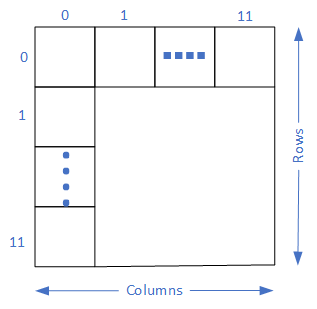
A picture illustrating a two-dimensional array. The first index or subscript is the rows, and the second is the columns.
multtab: Single function version. This version of the program is simple, focusing on defining arrays and accessing their elements. The program uses one for-loop for each array dimension, indexing the array with the loop-control variables. Multiplication tables typically show products from 1×1 to 12×12, and the program uses the loop-control variables to calculate the products: row*col. However, C++ arrays are zero-indexed, forcing the program to offset the (b) for-loops: table[row - 1][col - 1].
  1. Defines a 12 × 12 array named table: the first 12 is the number of rows, the second 12 is the number of columns.
  2. Fills the array. For each iteration of the outer loop, the inner loop runs 12 times, so the assignment statement runs 144 times. Braces are optional as the nested loops form a single statement (one semicolon terminates the three lines of code).
  3. Prints the table. The outer loop iterates 12 times. For each outer loop iteration, the inner loop iterates 12 times. Therefore, the program prints table[row][col] 144 times and endl 12 times. The braces are required as the outer loop contains two distinct statements, each terminated with a semicolon. The column-loop is the first nested statement, and the endl output is the second. The setw manipulator formats each number so that it displays right-aligned in a field four characters wide, producing a table with neatly aligned columns.

multtab 2

When functions define multi-dimensional array parameters, they can omit the size of the first dimension, but must specify the size of the second and subsequent dimensions. This requirement results from how C⁠++ organizes and locates array elements in memory. (See Row-Major Ordering later in the chapter.) The following figure illustrates both notations with the multiplication table array.

PrototypeComments
void multtab(int tab[12][12]) The function and the client calling it "agree" on the number of rows and columns in advance.
void multtab(int tab[][12]), int nrows The function and the client calling it "agree" on the number of columns, but the function can operate on any number of rows if the client provides the number.
Two-dimensional function parameters. Regardless of how many dimensions an array has, C++ always passes it by pointer, which is an INOUT passing mechanism. The first version requires only a single argument: the array's address. This syntax makes defining and calling a function relatively easy; it also makes the function inflexible. The second version is more flexible, but it also requires an explicit parameter specifying the number of rows in the array.


Fixed Number Of Rows Variable Number Of Rows
#include <iostream>
#include <iomanip>
using namespace std;

void fill_table(int tab[12][12]);
void print_table(int tab[12][12]);

int main()
{
    int table[12][12];	// [rows] [cols]	// (a)

    fill_table(table);				// (b)
    print_table(table);				// (c)

    return 0;
}

void fill_table(int tab[12][12])		// (d)
{
    for (int row = 1; row <= 12; row++)
        for (int col = 1; col <= 12; col++)
            tab[row - 1][col - 1] = row * col;
}

void print_table(int tab[12][12])		// (e)
{
    for (int row = 0; row < 12; row++)
    {
        for (int col = 0; col < 12; col++)
            cout << setw(4) << tab[row][col];
        cout << endl;
    }
}
#include <iostream>
#include <iomanip>
using namespace std;

void fill_table(int tab[][12], int nrows);
void print_table(int tab[][12], int nrows);

int main()
{
    int table[12][12];	// [rows] [cols]	// (a)

    fill_table(table, 12);			// (b)
    print_table(table, 12);			// (c)

    return 0;
}

void fill_table(int tab[][12], int nrows)	// (d)
{
    for (int row = 1; row <= nrows; row++)
        for (int col = 1; col <= 12; col++)
            table[row - 1][col - 1] = row * col;
}

void print_table(int tab[][12], int nrows)	// (e)
{
    for (int row = 0; row < nrows; row++)
    {
        for (int col = 0; col < 12; col++)
            cout << setw(4) << table[row][col];
        cout << endl;
    }
}
multtab: Multiple functions version. Two versions of a program producing a 12 × 12 multiplication table. The syntax in the first version is compact and easy to understand, but it is used infrequently due to its inflexibility. The second version requires an additional parameter in the function to specify the number of rows in the table. Nevertheless, this version's increased flexibility makes it the more frequent choice.
  1. Defines a 12 x 12 array named table
  2. Calls a function to fill the array. C++ passes the array by pointer, an INOUT passing mechanism, so when the function ends, table is filled.
  3. Calls a function to print the array contents.
  4. Fills the array
  5. Prints the array