program counter, PC, von Neumann cycle, von Neumann architecture, machine code, stored program computer, central processing unit, CPU, arithmetic logic unit, ALU, register, main memory, secondary memory
Time: 00:03:13 | Download:
Large,
Large (CC),
Small |
Streaming,
Streaming (CC) |
Slides: PDF,
PPTX
Once the compiler has translated a C++ program into machine code, it's ready for a compatible computer to run it. Knowing the fundamental features of a stored program computer helps explain the sequence of machine instructions it runs. (Although a single C++ statement usually corresponds to multiple machine instructions, the following discussion ignores the distinction for simplicity.)
(a)
(b)
(c)
Stored program computers.
The mathematician John von Neumann published an abstract description of a stored program computer in 1945. Its defining feature was storing a program and its data in the same physical memory hardware.
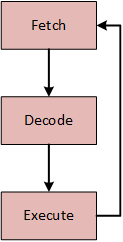
The von Neumann cycle: The computer takes three distinct steps to run a single machine code instruction. First, it fetches or loads the next instruction from memory. Second, it decodes the instruction to determine its meaning. Finally, it executes the instruction.
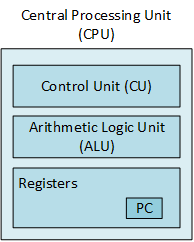
The von Neumann architecture: Although modern CPUs have advanced beyond this simple diagram, they still contain the illustrated sub-components.
The control unit drives the von Neumann cycle and directs the other components.
The arithmetic logic unit carries out simple arithmetic and logical operations such as ADD and AND.
Registers are the highest-level units of memory. They are one-word (typically 32- or 64-bits) wide and are relatively fast. Different CPUs contain a varying number of registers, some general-purpose and others dedicated to a specific task. The program counter (PC) is a dedicated register that stores the address of the next machine instruction the computer fetches. Each fetch operation automatically increments or advances the PC to the next instruction. Consequently, programs must change the address stored in the PC to deviate from executing a simple linear sequence of instructions.
A simplified view of computer memory, dividing it into three levels: registers, main memory (RAM), and secondary memory (hard drive, USB stick).
Flow Of Control Statements
flow of control, execution path, nexus of control, control statement, branch, if-statement, if-else-statement, switch-statement, loop, for-loop, for-each-loop, while-loop, do-while-loop, if, switch, case, for, while, do
No program of any significant size or complexity consists solely of sequential operations. Accordingly, all imperative programming languages include control statements that increase a program's structure and flexibility. We can understand the effect of these statements by imagining that we print out a program on fan-fold paper, the long, continuous paper used by old dot-matrix and line printers. Further, imagine that we spread the program out on a long table and place the tip of a marker at the beginning of the main function. Mentally run the program, tracing each instruction with the marker as you run it. We must pick up the marker and move it when the program calls a function and return it when the function ends. The marker traces the path as it branches, loops, and jumps to functions.
The program branches and loops are controlled by a set of conditions. Each condition rests on the program's state: the values currently stored in one or more variables, or other environmental situations that change over time. The ink trace left on the paper represents the program's flow of control or execution path taken under one set of conditions. At any given time during execution, the location of the marker represents the program's focus or nexus of control - the instruction the CPU is currently executing.
Sequential
Branches (also known as decisions)
if
if-else
switch (with cases)
Loops (also known as iteration)
for
for-each (also known as range-based)
while
do-while
Classifying control statements.
C++, Java, and other imperative programming languages generally provide three basic categories of control statements: sequential, branches, and loops. Branches and loops are more complex, altering the sequential execution achieved with only the program counter. Due to their complexity, programmers often further decompose them into different kinds of branch and loop statements.
Each kind of statement helps solve a particular problem, adding power and complexity to a solution. Nesting one statement inside another amplifies the statements' computational power and complexity. C++ does not limit how deeply a program can nest control statements, but the logic becomes difficult to follow if they are nested too deeply. What constitutes "too deeply" is a function of the problem, the program, and a programmer's personal taste. Nevertheless, a good rule of thumb is to limit nesting to three or four levels of branches and loops.
Control Statement Keywords And Symbols
flow of control, control statement, if, else, switch, case, break, continue, for, while, do,
(, ), ;, :, {, }, ,
All imperative programming languages build the flow of control statements with keywords and symbols. They often use different words and symbols to represent the same concepts. For example, C, C++, Java, and C# use { and } to delimit a control statement's body. Pascal, Modula II, and Ada use the keywords begin and end for the same purpose. Although not as evident, Python uses indentation to group control statements.
Keywords
Symbols
if
else
switch
case
for
while
do
break
continue
(
)
;
:
{ (sometimes optional)
} (sometimes optional)
, (used infrequently)
Control statements keywords and symbols.
C++ is a case-sensitive programming language, meaning that two words with the same letters, but with even one letter in a different case, the compiler interprets them as different words. So, for example, "while" is not the same as "While." C++ spells the keywords used to create flow-of-control statements with all lower-case letters. Furthermore, the control statements require several special symbols; some are optional, but many are required.
Sequential Statements
sequential statements
#include <iostream>
using namespace std;

int main()
{
    double    f;
    cout << "Enter a temperature in Fahrenheit: ";
    cin >> f;

    double    c = 5.0 / 9.0 * (f - 32);

    cout << "The temperature in Celsius = " << c << endl;

    return 0;
}
Sequential statements.
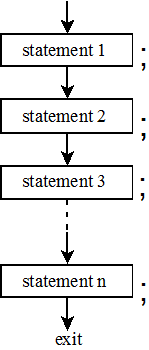
Sequential statements are simple, running from the top to bottom (from the first to the last), each running exactly once.
The picture graphically illustrates the structure and operation of sequential statements, while emphasizing that each statement ends with a semicolon.
The ftoc program from Chapter 2 illustrates a program using only sequential statements.
Sequential statements form the foundation for all programs, but are, by themselves, insufficient to solve even modestly complex problems. Programming languages define "statements" recursively, meaning that they can add branch or loop structures to a sub-statement to make one that is more complex. The next section considers complex statements and the related prerequisite concepts: block structure and logical expressions.