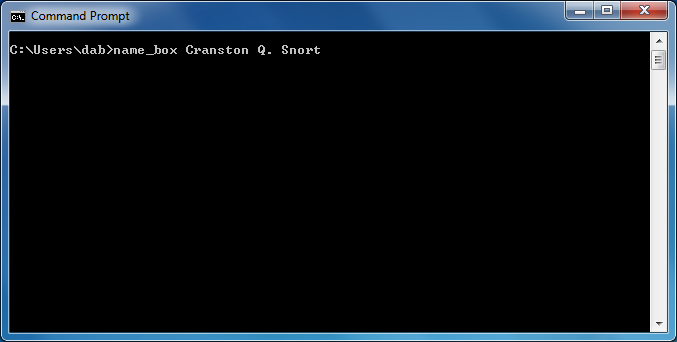
Command-line arguments were a staple of the old command-line interfaces (CLI) of DOS, Unix, and similar operating systems. Although most users now interact with computers through a graphical user interface (GUI), most modern operating systems still provide a CLI. Windows has two CLIs: the "Command Prompt" and the "PowerShell," and Linux has a "Terminal" with a variety of user-selectable shells for command-line processing. A complete command line includes the command name (a program or shell command a user wishes to run) and optional command arguments. The following figure imagines rewriting name_box as a CLI program. The command line begins with the program's name, and the person's name it draws a box around:
Windows cmd.exe
Linux Terminal
Command line windows.
Contemporary desktop operating systems typically implement command-line interfaces (CLIs) as windows. Each command line has a command name and zero or more command arguments. The CLI parses the command into its constituent parts or space-delimited tokens. Both examples illustrate a command line where name_box is the command (i.e., the program) that the user wishes to run, and Cranston, Q., and Snort are the command arguments (i.e., the data input).
Some may argue that the widespread use of GUIs leaves the CLIs obsolete and unnecessary. This assertion is likely true for users who only run application programs. Alternatively, software developers should consider the following:
Launching a program by clicking on an icon does use the command line. Each icon contains command-line information, but it's hidden in the icon's details. Hiding CLI information in an icon makes it easier for everyday users to run programs, but it implies that application developers must understand the CLI even in a predominantly GUI environment.
Whenever the operating system spawns a new process (i.e., runs a program), it locates the executable file (the program) and passes information into it through the CLI. You must know about command-line arguments if you create a program that launches another program, which is not uncommon in "real-world" programming.
The operating system automatically starts some programs (e.g., file and web servers) when the computer boots up, and they run without communicating directly with a user. These programs do not have or need a GUI.
Administrators can only launch some computer maintenance and administration programs through a CLI.
In summary, if you only use a computer to surf the web, interact with friends through social media, run office automation software, post pictures of your grandchildren, etc., you don't need to know about the command line. However, if you are a computer professional, knowing how to use the CLI and command-line arguments is a necessary, basic skill.
Processing Command Line Arguments
command line arguments, argv, argc, current working directory, CWD
In C++, accessing the command line arguments begins with adding two arguments to main. The operating system launches a program, passing arguments into it through main. The order and types of the parameters are fixed. Like any function, you may choose the names for the parameters; however, argc and argv are traditional names, and I recommend that you use them unless there is a compelling reason to use different names.
C:\Users\dab\>name_box Cranston Q. Snort
C:\Users\dab\>.\name_box Cranston Q. Snort
(a - cmd.exe)
(b - PowerShell)
dab@stereo~$ ./a.out Cranston Q. Snort
dab@stereo~$ ./name_box Cranston Q. Snort
(c - Linux)
(d - Linux)
#include <iostream>
using namespace std;

int main(int argc, char* argv[])
{
    cout << "argc is " << argc << endl;

    for (int i = 0; i < argc; i++)
        cout << "argv[" << i << "] is " << argv[i] << endl;

    return 0;
}
(e)
(f)
The two sides of command line processing.
It's necessary to view and understand command-line processing from both the user's and the program's perspectives. (a) through (d) illustrate running the name_box program with various CLIs. The command prompts vary across interfaces and are often user-configurable, but the highlighted command and arguments show little variation across systems. The Windows Command Prompt (a) assumes that the program is in the current working directory (CWD). To reduce the risk of inadvertently running Trojan Horse programs, newer CLIs require explicitly naming the CWD with the "dot."
A Windows command line consisting of a program name and three argument strings.
A Windows PowerShell, similar to a command prompt but requiring ".\" before the command or program name.
If an executable is not explicitly named when compiled on a Linux system, the compiler names it a.out by default.
Programmers can also specify an executable name when compiling a program.
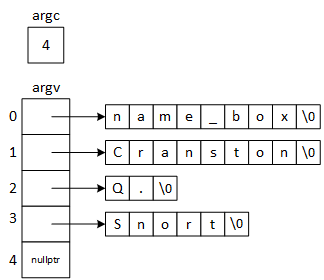
For a program to access command line arguments, programmers must add two parameters to main. argc, short for argument count, is the number of command-line arguments, including the program's name. argv, short for argument vector, is an array of C-strings or character pointers, pointing to each command line argument. (In this context, "vector" is a synonym for an array.) It is up to the program to determine what the strings mean or how to use them. Notice that the for-loop processing the arguments begins at 1, skipping the program name. The next section demonstrates command-line processing by updating the name_box program.
The picture illustrates the relationship between the command line argument and the main function's parameters, as the operating system passes them into the function. Notice that none of the argv strings contain spaces: The processor uses the spaces in the command-line as delimiters, but discards them during the parsing operation.
The text explores pathnames in detail in the last chapter.
Integrated development environments (IDEs) allow programmers to enter command elements when running programs during testing, though the exact procedures vary between environments.


![The picture illustrates the relationship between argc, argv, and the command 'name_box Cranston Q. Snort'. The command has four elements, including the command name, so argc=4. argv is an array of pointers: argv[0] points to name_box\0, argv[1] points to Cranston\0, argv[2] points to Q.\0, argv[3] points to Snort\0, and argv[4] is set to nullptr.](images/cl-pic.png)