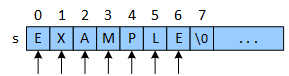
Obtaining a string's length - the number of characters it currently stores - is a basic string operation. String objects support the dot operator, and most string classes provide a length function. However, C-strings, like all fundamental types, do not support the dot operator. In place of the .length() function defined by most string classes, the standard C-string library provides the strlen function, which counts and returns the number of characters in a C-string. The function does not count the null termination character or any characters following it.
strlen: String-Length
strlen(s)
Getting the length of a C-string. The length of a string is the number of characters currently stored in the string, not the total capacity of the string. The length of the string does not include the null termination character, so strlen(s); returns 7.
Common strlen error.
C-strings are primitive data, so they do not support the dot operator. Programmers cannot use the .length() function with any C-string.
The strlen function.
The compiler automatically inserts a null termination character at the end of the string literal "EXAMPLE", but strlen doesn't count it as a part of the string's length and ignores any characters following it.
Possible strlen Implementations
strlen
Implementing a string as a fundamental data type involves balancing conflicting goals. C-strings prioritize structural simplicity and passing efficiency at the expense of some operations running more slowly. The C-string strlen counts the characters to obtain the string's length, resulting in a linear runtime. Fortunately, the counting loop is small and consists of a few machine instructions. Furthermore, optimizing compilers typically cache the function's return value (e.g., when driving a loop) if the string doesn't change. Programmers can implement the counting loop in many ways.
int strlen(const char* s)
{
	int	len = 0;

	while (s[len])
		len++;

	return len;
}
int strlen(const char* s)
{
	int	len = 0;

	while (*(s+len))
		len++;

	return len;
}
(a)
(b)
int strlen(const char* s)
{
	int len = 0;

	for (; s[len]; len++)
		;

	return len;
}
int strlen(const char* s)
{
	int len = 0;

	for (; *(s+len); len++)
		;

	return len;
}
(c)
(d)
Implementing strlen.
The strlen function "walks" the C-string from left to right with a loop and counts each character. The null-termination character is equivalent to 0 and is interpreted as false, causing the loop to end.
Versions (a) and (c) use an indexing notation that may be more familiar and easier to understand. The (b) and (d) versions use address arithmetic and the dereference operator.