Programmers inadvertently introduce several different kinds of errors into the programs they write. Although functions can contain any of the listed errors, they are the primary cause of assembly (aka, linker or loader) errors. The previous discussion of assembly errors focused on a minor problem arising only on Windows systems in a specific situation. This section expands on the earlier discussion with more authentic, albeit small, examples.
Assembly Errors: Function Inconsistencies
Assembly error, linker error, loader error, multi-file program, IDE
Contemporary programs and program systems can consist of thousands or millions of lines of code, typically spanning many files. For example, an office automation suite consists of a bundled set of related applications, including a word processor, a spreadsheet, a presentation program, and a database. To eliminate duplicate code and provide a consistent user interface, the programs often share some files. The compiler component individually translates each source code file to machine code and saves it in an object file. The linker or loader assembles the object files into executable programs.
Assembling object files is a relatively fast operation, faster than compiling source to object code. So, another advantage of this approach is that programmers don't need to recompile unmodified source code files to assemble an executable program. However, the approach also allows assembly errors when a program defines a function in one file but calls it in another - a typical situation in multi-file programs. When the compiler component processes a source code file, it needs function declarations or prototypes for functions defined in other files. It uses the prototypes to validate the calls, ensuring that they match the definition. If a programmer modifies a function header in one file but fails to update the corresponding prototype in a file calling the function, an assembly (i.e., linker or loader) error occurs. Alternatively, the programmer may update the prototype in the calling file but fail to recompile it to object code. The most frequent mismatches are the function name (including capitalization) and the number or type of parameters.
file1: Definition
file2: Call
#include <iostream>
using namespace std;

void foo(int x, int y, int z)
{
    cout << x << "  " << y << " " << z << endl;
}
#include <iostream>
using namespace std;

void foo(int x, int y);
void Foo(int x, int y, int z);

int main()
{
    foo(10, 20);
    Foo(10, 20, 30);
    return 0;
}
(a)
(b)
Diagnostics
1>------ Build All started: Project: linkerrors, Configuration: Debug Win32 ------
1>file2.cpp
1>file1.cpp
1>D:\tmp\CPP\link\linkerrors\linkerrors\file2.cpp(8,12): error C2660: 'foo': function does not take 2 arguments
1>D:\tmp\CPP\link\linkerrors\linkerrors\file2.cpp(4,6): message : see declaration of 'foo'
1>D:\tmp\CPP\link\linkerrors\linkerrors\file2.cpp(9,2): error C3861: 'Foo': identifier not found
1>Generating Code...
1>Done building project "linkerrors.vcxproj" -- FAILED.
========== Build All: 0 succeeded, 1 failed, 0 skipped ==========
file1.cpp
file2.cpp
file2.cpp(8): error C2660: 'foo': function does not take 2 arguments
file2.cpp(9): error C3861: 'Foo': identifier not found
Generating Code...
(c - Windows)
/usr/bin/ld: file2.o: in function `main':
file2.cpp:(.text+0x13): undefined reference to `foo(int, int)'
/usr/bin/ld: file2.cpp:(.text+0x27): undefined reference to `Foo(int, int, int)'
collect2: error: ld returned 1 exit status
(d - Linux)
Assembly error: Inconsistent function definition and prototypes.
Both files are internally consistent and compile. However, the inconsistency between the function name and the number of parameters in the function definition (file1), and the name and number of arguments in the prototypes and calls (file2) prevents the final program from assembling (linking or loading).
The first file defines a function whose name begins with a lowercase f and requires three integer parameters.
The second file provides two incorrect prototypes. The function calls match the prototypes, so the source code compiles, creating an object file.
The diagnostics generated by the Visual Studio IDE (top) and the command-line compiler (bottom). IDEs typically produce more extensive diagnostics than command-line compilers. "linkerrors" is the project name, not an error indicator.
The diagnostics generated by g++, which automatically calls the loader, ld, to assemble the object files.
Reducing Linker/Loader Errors
linker, loader, linker error, loader error, project, makefile, make, header, function header, prototype, header file, g++, Visual Studio, IDE
No programming language or device can prevent programmers from putting bugs in their programs. However, they can take steps to reduce the errors arising from mismatched function definitions and calls spanning files. The steps rely on an established programming practice and widely available programming tools. The Chapter 5 version of the Time example demonstrated using a programmer-written header file. Header files often contain structure or class specifications, but, as the following figure illustrates, they can consist solely of prototypes.
Projects and makefiles allow programmers to describe the dependencies between the various files comprising a program. Used with header files, they keep dependent object files up to date. These tools compare the timestamps (i.e., the time the file was last modified) of the dependent and independent files. Whenever a dependent object file is out of date (i.e., older than any of the files it depends on), the tool recompiles it.
void foo(int x, int y, int z);
#include <iostream>
#include "example.h"
using namespace std;

int main()
{
    foo(10, 20);
    Foo(10, 20, 30);

    return 0;
}
(a - example.h)
#include <iostream>
using namespace std;

void foo(int x, int y, int z)
{
    cout << x << "  " << y << " " << z << endl;
}
(b - file1.cpp)
(c - file2.cpp)
Reducing linker/loader errors with header files.
Putting function prototypes in header files makes it easier to maintain consistent declarations across multiple source code files that call the functions. It also allows programmers to establish that the calling file is dependent on the header file rather than on the source code file defining the function. Programmers must update the prototype in the header file whenever they change the function's header.
Put the correct prototype to a header file named example.h.
The function prototype must always match the function header.
#include the header in all files calling the foo function.
Putting the function prototype in a header file doesn't substantially change the Windows diagnostic, but it significantly increases the information in the Linux diagnostic output.
Establishing dependencies with projects and makefiles.
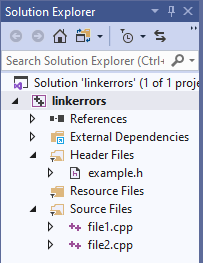
Most IDEs allow programmers to organize their code into individual projects. For example, Visual Studio solutions consist of one or more projects, where each project represents a program. Projects automate program building by calling the compiler and linker as programmers write and modify the code.
Programmers write makefiles to establish the dependencies between a program's files, and to specify the programs needed to build the final executable. The lines highlighted in blue establish the dependencies. For example, the executable, linkerror, depends on the two object files. Each object file depends on the header file and the corresponding source code file. The lines highlighted red and beginning with a tab character build the file preceding the colon. For example, the command g++ -c builds the object files, while g++ -o builds the executable by calling the loader, ld, and passing to it the object files and appropriate command-line options. The make command searches, in order, for files named "Makefile" and "makefile," opening and processing the first it finds.
Automatic program building helps keep function definitions and calls synchronized, reducing assembly errors caused by out-of-date object files.