Incorrect programs can fail for a variety of reasons and in a variety of ways. Computer scientists are responsible for preventing these failures by designing and implementing correct programs and rigorously testing them to validate that the output is correct. However, even programs whose calculations are correct can fail if users enter inappropriate data and the program doesn't detect it. Informally, programmers often describe secure, robust code that detects invalid input and prevents the program from failing as "bulletproof."
Prevention
Neglecting to account for a possible condition in a problem is a common source of program run-time errors. Programs must account for all possible situations and provide appropriate, predictable responses. These situations only become a program failure if programmers fail to recognize and allow for them.
Cause
A logically correct program, written without coding errors, can still fail if the user enters data that doesn't meet the program's requirements. Frequently, the data is incorrect, out of bounds, or not formatted correctly. Focus on boundary conditions - "adjacent" data values where one value is valid, and the other isn't (e.g., 0 and -1 in the following example).
Detection
Failing programs can manifest their failure in many ways. Surprisingly, we are better served when a program fails quickly, "crashing" rather than continuing to run in an abnormal state and potentially doing further damage (e.g., corrupting a database or increasing the power of an already overheated nuclear reactor). Better still, is detecting and reporting the problem, and either taking corrective measures or safely aborting the program. The text presents non-object-oriented error handling here and introduces exception handling in a subsequent chapter.
Response
If a program detects an error before it crashes, it can act to prevent the crash or cause any collateral damage. If a user action, entering incorrect data or data in an incorrect format, caused the error, the program should display a diagnostic informing the user of the error and its cause. In some cases a graceful and controlled shutdown following the diagnostic may be appropriate; in other cases it's more appropriate to allow the user to take remedial action (e.g., enter correct data, reformat the input, or choose a different operation) and continue running. Programs should handle errors as near to their detection as possible.
Audience
Consider who will read the program's diagnostics, as different audiences (software developers vs. end users) have different needs. Developers benefit by knowing where the error occurred and the program's state (the current values saved in important variables). In contrast, users need to know what action or input caused the problem and how to correct it.
Detecting and responding to run-time errors: Quadratic formula example.
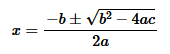
Programs that read and process user input must ensure that the input is valid in the context of the problem and its solution. For example, when finding the roots of a quadratic equation with the quadratic formula, users enter the function's coefficients. However, two situations can cause a naive implementation to fail. First, if the coefficient a is 0, the formula fails with a divide-by-zero error. Second, in the expression b2‑4ac (called the discriminant) in the quadratic formula, some combinations of coefficients evaluate to a negative value, causing the square root function to fail. Programs detect and avoid potential input errors with simple control statements.
A quadratic equation with three real coefficients, a, b, and c.
The quadratic formula calculates the roots of a quadratic equation from the coefficients.
The initial, error-prone program calculates the roots but does not validate the user input, so it fails if the user enters 0 for the first coefficient.
An if-statement detects the erroneous input, displays a user-oriented error message, and gracefully terminates the program.
A discriminant less than 0 represents a valid, although imaginary, root, which the program must calculate differently than the real roots. Please notice the "-" in the function call sqrt(-discriminant).
Secure, bulletproof programs account for all possible input and act preemptively to prevent failures.
Library and API functions pervade general computing. They are necessarily very general because library programmers implement them before application programmers use them. How can such general functions "know" how to respond appropriately in the case of a failure? For example, terminating a program controlling an aircraft in flight or a running nuclear reactor is a bad choice. In these and many more common situations, failing functions must defer to a part of the program that does "know" what action is appropriate. So, many library functions report the failure but take no further action. One way that functions can report failure is through their return value.
Two examples demonstrate how library math functions report errors through their return values. From experience, we know that taking the square root of a negative number is an illegal operation, and we reinforce that understanding by looking at a graph of the square root function. The square root function's domain - its legal arguments - is all non-negative numbers. Alternatively, the natural logarithm goes to negative infinity at x=0 (see the graph of the natural logarithm). The sqrt and log functions report these extreme situations by returning carefully crafted values that aren't "real" numbers.
double e1 = sqrt(-2);

cout << e1 << endl;

if (isnan(e1))
	cerr << "It is a NaN" << endl;
else
	cerr << "It is NOT a NaN << endl";
double e2 = log(0);

cout << e2 << endl;

if (isinf(e2))
	cerr << "It is Inf" << endl;
else
	cerr << "It is NOT Inf" << endl;
-nan
It is a NaN
-inf
It is Inf
(a)
(b)
NaN and Inf: The IEEE 754 floating-point standard. Most modern computers use the IEEE 754 standard to encode floating-point numbers. The standard divides the bits of a floating number between a mantissa, exponent, sign bit, and an implied bit called the shadow bit. The compiler and hardware work together to hide these details from programmers. Curiously, some IEEE bit-patterns do not correspond to "real" numbers and the standard uses them to represent different failure values: Inf, ‑Inf, NaN, and ‑NaN (infinity and not a number, respectively). Functions returning these values do not "crash," but any additional operation on an Inf or NaN results in a NaN. If a program doesn't explicitly test for these values, the failure goes unnoticed until we look at the result.
A NaN prints as some variation of "nan" (the exact output is system-dependent), but programs can explicitly test for the value at any time with the isnan function.
Similarly, programs can test for an Inf value with the isinf function.
char oldname[NAME_SIZE];
char newname[NAME_SIZE];
cout << "Please enter the old and new file names: ";

cin.getline(oldname, NAME_SIZE);	// reads a string from the console
cin.getline(newname, NAME_SIZE);

if (rename(oldname, newname) != 0)
{
	cerr << "File not renamed" << endl;
	exit(1);
}
System calls and error status. It's common for system calls to return an integer-encoded error status. They follow a typical protocol of returning 0 on success and -1 when they fail, but you should always check the "Return Value" section of the documentation. The example illustrates how programs can use the return value with the rename system call. The call renames a directory or folder, as illustrated. If the argument directory is busy (being used by another program), or if the current working directory contains a sub-directory or file with that name, rename fails.
The above examples are based on library functions and system calls, but we can also use return values to indicate the success or failure of functions we write as part of an application. This technique is handy when the function otherwise has a void return type, but it works as long as there are at least two values we can use to signal the function's status. The following figure demonstrates two similar approaches using skeletonized code fragments.
int function1(...)
{
	if (...)
	{
		...;
		return 1;
	}
	if (...)
	{
		...;
		return 2;
	}
	...;
	return 0;
}
(a)
(b)
Application functions returning an error status. For generality, ellipses replace the parameters, branching conditions, and other statements. Using multiple return statements isn't necessary but is often convenient. The function returns an error status as soon as it detects a problem and only returns a success status when it completes its tasks.
Functions can return a Boolean status when they only need to signal success or failure.
Functions typically return an integer status when they can experience multiple failure modes. By themselves, the numbers "0," "1," and "2" convey little information to someone reading the source code. Programmers often use enumerations to eliminate these "magic numbers."
The C programming language defines a global integer variable named errno, which C++ inherits. At some point in their execution, all <cmath> functions save their status in errno, indicating their success or failure. However, the next library function the program calls overwrites the saved status, so the program must check the value immediately after the function returns. The functions indicate their status as an arbitrary integral value. To improve program readability, the error system provides various symbolic constants or error codes. Each constant name begins with "E" (signifying an error) followed by a cryptic, abbreviated description, for example: EDOM (domain error), ERANGE (range error), or EADDRINUSE (address in use error). Application programs can use branching logic to test errno and display appropriate diagnostics.
Using errno to detect and report errors.
The primary weakness of the errno system is that programs must voluntarily and consistently check the saved value to determine the health of an associated function call. Exception handling addresses this weakness.
<cmath> functions indicate success by setting errno to 0.
Programs can test for specific error conditions with if- and switch-statements.
sqrt error: Domain error
log error: Result too large
Reporting errors with perror.
The code fragment illustrates how the perror library function compactly converts the status saved in errno to a terse but descriptive diagnostic. Programs pass a single string argument to perror, which prints it verbatim to cerr. The string typically contains appropriate diagnostic information such as the cause of the failure and any remedial actions the user may take.
A programming assertion establishes a precondition, a requirement or prerequisite, that must be satisfied before an operation can occur. When the precondition fails, the assertion displays a diagnostic message and calls abort, terminating the program. The diagnostic output, exclusively benefiting software developers, includes the failed assertion and its location (the name of the file containing the assertion and line number where it failed). This information is unhelpful to users because they generally don't have access to the source code, nor does it tell them how to correct the error. However, it is invaluable to developers, especially in the case of large programs with many files, as it helps them quickly locate the error.
The preprocessor implements assertions as parameterized macros, giving it access to the textual assertion expressions and their locations. The preprocessor converts the assert macro into debugging information and passes the modified code to the compiler component. Ordinarily, the process of translating source to machine code would lose the textual and location information, but the preprocessor retains it in the modified code. The preprocessor can also conditionally strip assertions out of the source code so that the executable does not suffer any run-time performance degradation or unnecessary increase in size. Consequently, programmers can leave insertions in place and activate or deactivate them as needed.
Assertion system examples.
The assert macro looks like a function call requiring an integer-valued expression. When the program evaluates the expression, it treats a 0-value as a failure, triggering assert to display a diagnostic message and abort the program. The program treats a non-0-value as success, and assert does nothing.
An assertion example ensuring a variable is non-negative before taking its square root.
An assertion example ensuring a variable is greater than zero before calculating its natural logarithm.
The failed assertion diagnostic includes the assertion expression and the failure location.
Programmers can deactivate assertions, leaving them in the code, by defining NDEBUGbefore the #include <cassert> directive.
Programmers can also deactivate assertions by defining NDEBUG with a command-line option: -D NDBUG (Unix/Linux systems) or /D NDBUG (Windows) - the space between the option letter and the name is optional. IDEs can also define NDEBUG, but the method varies.